# Langfuse Observability
[Langfuse](https://langfuse.com/) ([GitHub](https://github.com/langfuse/langfuse)) is an open source LLM engineering platform that helps teams to collaboratively develop, monitor, and debug AI applications. Langfuse integrates with the AI SDK to provide:
- [Application traces](https://langfuse.com/docs/tracing)
- Usage patterns
- Cost data by user and model
- Replay sessions to debug issues
- [Evaluations](https://langfuse.com/docs/scores/overview)
## Setup
The AI SDK supports tracing via OpenTelemetry. With the `LangfuseExporter` you can collect these traces in Langfuse.
While telemetry is experimental ([docs](/docs/ai-sdk-core/telemetry#enabling-telemetry)), you can enable it by setting `experimental_telemetry` on each request that you want to trace.
```ts highlight="4"
const result = await generateText({
model: openai('gpt-4o'),
prompt: 'Write a short story about a cat.',
experimental_telemetry: { isEnabled: true },
});
```
To collect the traces in Langfuse, you need to add the `LangfuseExporter` to your application.
You can set the Langfuse credentials via environment variables or directly to the `LangfuseExporter` constructor.
To get your Langfuse API keys, you can [self-host Langfuse](https://langfuse.com/docs/deployment/self-host) or sign up for Langfuse Cloud [here](https://cloud.langfuse.com). Create a project in the Langfuse dashboard to get your `secretKey` and `publicKey.`
```bash filename=".env"
LANGFUSE_SECRET_KEY="sk-lf-..."
LANGFUSE_PUBLIC_KEY="pk-lf-..."
LANGFUSE_BASEURL="https://cloud.langfuse.com" # 🇪🇺 EU region, use "https://us.cloud.langfuse.com" for US region
```
```ts
import { LangfuseExporter } from 'langfuse-vercel';
new LangfuseExporter({
secretKey: 'sk-lf-...',
publicKey: 'pk-lf-...',
baseUrl: 'https://cloud.langfuse.com', // 🇪🇺 EU region
// baseUrl: "https://us.cloud.langfuse.com", // 🇺🇸 US region
});
```
Now you need to register this exporter via the OpenTelemetry SDK.
Next.js has support for OpenTelemetry instrumentation on the framework level. Learn more about it in the [Next.js OpenTelemetry guide](https://nextjs.org/docs/app/building-your-application/optimizing/open-telemetry).
Install dependencies:
```bash
npm install @vercel/otel langfuse-vercel @opentelemetry/api-logs @opentelemetry/instrumentation @opentelemetry/sdk-logs
```
Add `LangfuseExporter` to your instrumentation:
```ts filename="instrumentation.ts" highlight="7"
import { registerOTel } from '@vercel/otel';
import { LangfuseExporter } from 'langfuse-vercel';
export function register() {
registerOTel({
serviceName: 'langfuse-vercel-ai-nextjs-example',
traceExporter: new LangfuseExporter(),
});
}
```
```ts highlight="5, 8, 31"
import { openai } from '@ai-sdk/openai';
import { generateText } from 'ai';
import { NodeSDK } from '@opentelemetry/sdk-node';
import { getNodeAutoInstrumentations } from '@opentelemetry/auto-instrumentations-node';
import { LangfuseExporter } from 'langfuse-vercel';
const sdk = new NodeSDK({
traceExporter: new LangfuseExporter(),
instrumentations: [getNodeAutoInstrumentations()],
});
sdk.start();
async function main() {
const result = await generateText({
model: openai('gpt-4o'),
maxOutputTokens: 50,
prompt: 'Invent a new holiday and describe its traditions.',
experimental_telemetry: {
isEnabled: true,
functionId: 'my-awesome-function',
metadata: {
something: 'custom',
someOtherThing: 'other-value',
},
},
});
console.log(result.text);
await sdk.shutdown(); // Flushes the trace to Langfuse
}
main().catch(console.error);
```
Done! All traces that contain AI SDK spans are automatically captured in Langfuse.
## Example Application
Check out the sample repository ([langfuse/langfuse-vercel-ai-nextjs-example](https://github.com/langfuse/langfuse-vercel-ai-nextjs-example)) based
on the [next-openai](https://github.com/vercel/ai/tree/main/examples/next-openai) template to showcase the integration of Langfuse with Next.js and AI SDK.
## Configuration
### Group multiple executions in one trace
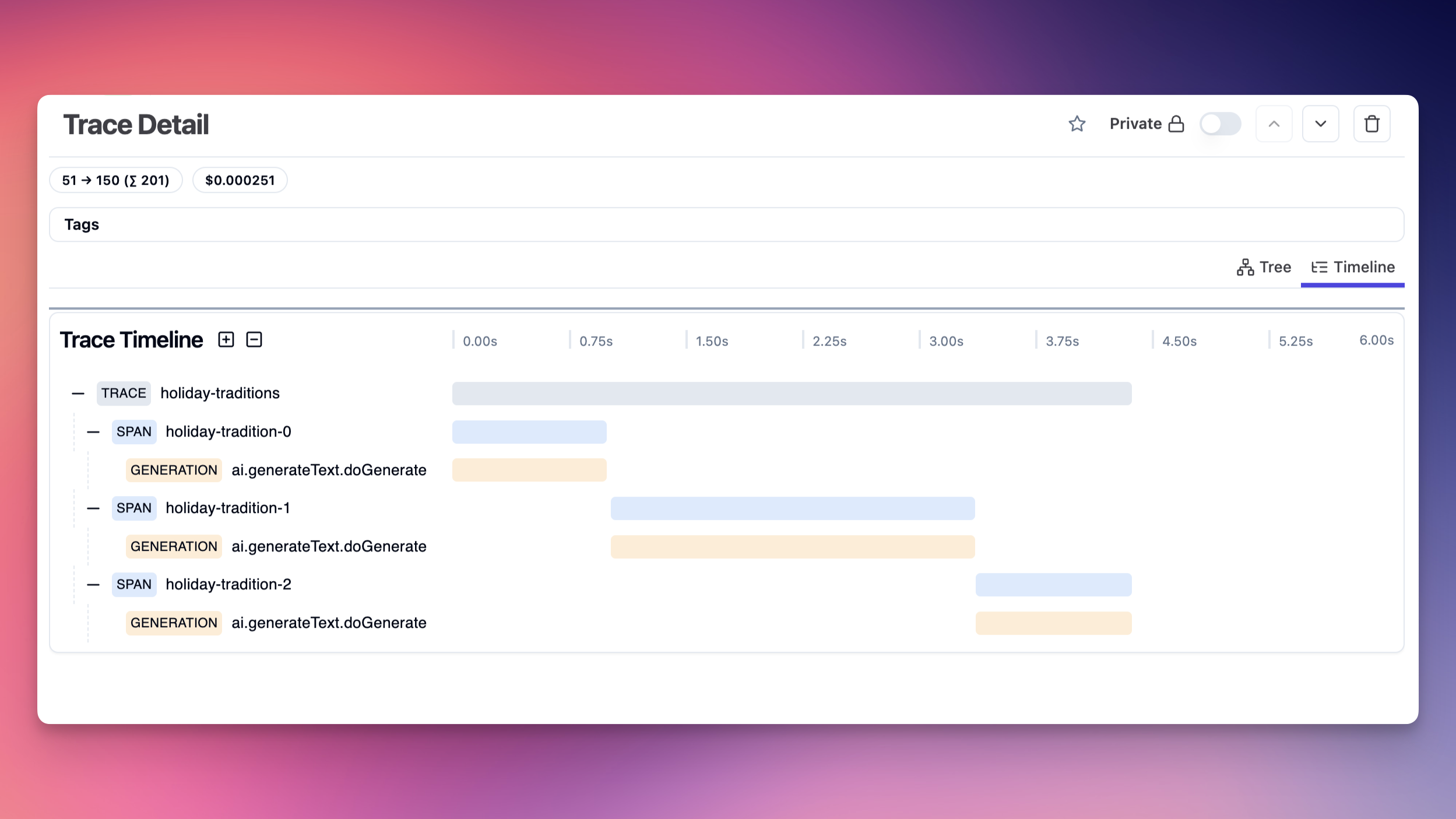
You can open a Langfuse trace and pass the trace ID to AI SDK calls to group multiple execution spans under one trace. The passed name in `functionId` will be the root span name of the respective execution.
```ts
import { randomUUID } from 'crypto';
import { Langfuse } from 'langfuse';
const langfuse = new Langfuse();
const parentTraceId = randomUUID();
langfuse.trace({
id: parentTraceId,
name: 'holiday-traditions',
});
for (let i = 0; i < 3; i++) {
const result = await generateText({
model: openai('gpt-3.5-turbo'),
maxOutputTokens: 50,
prompt: 'Invent a new holiday and describe its traditions.',
experimental_telemetry: {
isEnabled: true,
functionId: `holiday-tradition-${i}`,
metadata: {
langfuseTraceId: parentTraceId,
langfuseUpdateParent: false, // Do not update the parent trace with execution results
},
},
});
console.log(result.text);
}
await langfuse.flushAsync();
await sdk.shutdown();
```
The resulting trace hierarchy will be:
### Disable Tracking of Input/Output
By default, the exporter captures the input and output of each request. You can disable this behavior by setting the `recordInputs` and `recordOutputs` options to `false`.
### Link Langfuse prompts to traces
You can link Langfuse prompts to AI SDK generations by setting the `langfusePrompt` property in the `metadata` field:
```typescript
import { generateText } from 'ai';
import { Langfuse } from 'langfuse';
const langfuse = new Langfuse();
const fetchedPrompt = await langfuse.getPrompt('my-prompt');
const result = await generateText({
model: openai('gpt-4o'),
prompt: fetchedPrompt.prompt,
experimental_telemetry: {
isEnabled: true,
metadata: {
langfusePrompt: fetchedPrompt.toJSON(),
},
},
});
```
The resulting generation will have the prompt linked to the trace in Langfuse. Learn more about prompts in Langfuse [here](https://langfuse.com/docs/prompts/get-started).
### Pass Custom Attributes
All of the `metadata` fields are automatically captured by the exporter. You can also pass custom trace attributes to e.g. track users or sessions.
```ts highlight="6-12"
const result = await generateText({
model: openai('gpt-4o'),
prompt: 'Write a short story about a cat.',
experimental_telemetry: {
isEnabled: true,
functionId: 'my-awesome-function', // Trace name
metadata: {
langfuseTraceId: 'trace-123', // Langfuse trace
tags: ['story', 'cat'], // Custom tags
userId: 'user-123', // Langfuse user
sessionId: 'session-456', // Langfuse session
foo: 'bar', // Any custom attribute recorded in metadata
},
},
});
```
## Debugging
Enable the `debug` option to see the logs of the exporter.
```ts
new LangfuseExporter({ debug: true });
```
## Troubleshooting
- If you deploy on Vercel, Vercel's OpenTelemetry Collector is only available on Pro and Enterprise Plans ([docs](https://vercel.com/docs/observability/otel-overview)).
- You need to be on `"ai": "^3.3.0"` to use the telemetry feature. In case of any issues, please update to the latest version.
- On NextJS, make sure that you only have a single instrumentation file.
- If you use Sentry, make sure to either:
- set `skipOpenTelemetrySetup: true` in Sentry.init
- follow Sentry's docs on how to manually set up Sentry with OTEL
## Learn more
- After setting up Langfuse Tracing for the AI SDK, you can utilize any of the other Langfuse [platform features](https://langfuse.com/docs):
- [Prompt Management](https://langfuse.com/docs/prompts): Collaboratively manage and iterate on prompts, use them with low-latency in production.
- [Evaluations](https://langfuse.com/docs/scores): Test the application holistically in development and production using user feedback, LLM-as-a-judge evaluators, manual reviews, or custom evaluation pipelines.
- [Experiments](https://langfuse.com/docs/datasets): Iterate on prompts, models, and application design in a structured manner with datasets and evaluations.
- For more information, see the [telemetry documentation](/docs/ai-sdk-core/telemetry) of the AI SDK.
## Navigation
- [Axiom](/v5/providers/observability/axiom)
- [Braintrust](/v5/providers/observability/braintrust)
- [Helicone](/v5/providers/observability/helicone)
- [Laminar](/v5/providers/observability/laminar)
- [Langfuse](/v5/providers/observability/langfuse)
- [LangSmith](/v5/providers/observability/langsmith)
- [LangWatch](/v5/providers/observability/langwatch)
- [Maxim](/v5/providers/observability/maxim)
- [Patronus](/v5/providers/observability/patronus)
- [Scorecard](/v5/providers/observability/scorecard)
- [SigNoz](/v5/providers/observability/signoz)
- [Traceloop](/v5/providers/observability/traceloop)
- [Weave](/v5/providers/observability/weave)
[Full Sitemap](/sitemap.md)