---
title: Chatbot Resume Streams
description: Learn how to resume chatbot streams after client disconnects.
url: "https://ai-sdk.dev/docs/ai-sdk-ui/chatbot-resume-streams"
docs_index: /llms.txt
---
> For an index of all documentation, see [/llms.txt](/llms.txt).
`useChat` supports resuming ongoing streams after page reloads. Use this feature to build applications with long-running generations.
In a resumable stream setup, client-side aborts are treated as disconnects.
Closing a tab, refreshing the page, or calling `stop()` only closes the
current HTTP connection and should not cancel the underlying generation. To
let users stop generation, add a dedicated stop endpoint that persists the
partial response, cancels the active work, and clears the active stream. See
[Stop an Active Resumable Stream](#stop-an-active-resumable-stream) and
[troubleshooting](/docs/troubleshooting/abort-breaks-resumable-streams) for
more details.
## How stream resumption works
Stream resumption requires persistence for messages and active streams in your application. The AI SDK provides tools to connect to storage, but you need to set up the storage yourself.
**The AI SDK provides:**
- A `resume` option in `useChat` that automatically reconnects to active streams
- Access to the outgoing stream through the `consumeSseStream` callback
- Automatic HTTP requests to your resume endpoints
**You build:**
- Storage to track which stream belongs to each chat
- Redis to store the UIMessage stream
- Two API endpoints: POST to create streams, GET to resume them
- Integration with [`resumable-stream`](https://www.npmjs.com/package/resumable-stream) to manage Redis storage
## Prerequisites
To implement resumable streams in your chat application, you need:
1. **The `resumable-stream` package** - Handles the publisher/subscriber mechanism for streams
2. **A Redis instance** - Stores stream data (e.g. [Redis through Vercel](https://vercel.com/marketplace/redis))
3. **A persistence layer** - Tracks which stream ID is active for each chat (e.g. database)
## Implementation
### 1. Client-side: Enable stream resumption
Use the `resume` option in the `useChat` hook to enable stream resumption. When `resume` is true, the hook automatically attempts to reconnect to any active stream for the chat on mount:
```tsx title="app/chat/[chatId]/chat.tsx"
'use client';
import { useChat } from '@ai-sdk/react';
import { DefaultChatTransport, type UIMessage } from 'ai';
export function Chat({
chatData,
resume = false,
}: {
chatData: { id: string; messages: UIMessage[] };
resume?: boolean;
}) {
const { messages, sendMessage, status } = useChat({
id: chatData.id,
messages: chatData.messages,
resume, // Enable automatic stream resumption
transport: new DefaultChatTransport({
// You must send the id of the chat
prepareSendMessagesRequest: ({ id, messages }) => {
return {
body: {
id,
message: messages[messages.length - 1],
},
};
},
}),
});
return
{/* Your chat UI */}
;
}
```
You must send the chat ID with each request (see
`prepareSendMessagesRequest`).
When you enable `resume`, the `useChat` hook makes a `GET` request to `/api/chat/[id]/stream` on mount to check for and resume any active streams.
The hook also reconnects when the page becomes visible again after being in the background (for example, after switching browser tabs or returning to a mobile app). This only happens when the stream was interrupted by a network disconnect. Healthy streams and other errors are left untouched.
`DefaultChatTransport` treats resumed streams as full replays by default, as
returned by the `resumable-stream` setup below. On the first `start` chunk, the
client resets the interrupted response and rebuilds it from the replay. This
prevents duplicate text, reasoning, and step parts after a network disconnect.
If your resume endpoint sends only the remaining chunks, set
`resumeStreamIsReplay: false`. This preserves the interrupted response even if
the continuation includes a `start` chunk with the same message ID:
```ts
const transport = new DefaultChatTransport({
resumeStreamIsReplay: false,
});
```
When a continuation omits the `start` chunk, the client preserves its interrupted
streaming state with either setting. Continuing active text or reasoning parts
requires the same chat instance; a page reload does not retain that streaming
state, so use a full replay for reloads.
The default transport URL-encodes the chat ID as a single path segment. IDs equal
to `.` or `..` are rejected with an `InvalidArgumentError` because URL parsers
interpret them as path traversal segments.
Let's start by creating the POST handler to create the resumable stream.
### 2. Create the POST handler
The POST handler creates resumable streams using the `consumeSseStream` callback:
```ts title="app/api/chat/route.ts"
import { openai } from '@ai-sdk/openai';
import { readChat, saveChat } from '@util/chat-store';
import {
convertToModelMessages,
createUIMessageStreamResponse,
generateId,
streamText,
toUIMessageStream,
type UIMessage,
} from 'ai';
import { after } from 'next/server';
import { createResumableStreamContext } from 'resumable-stream';
export async function POST(req: Request) {
const {
message,
id,
}: {
message: UIMessage | undefined;
id: string;
} = await req.json();
const chat = await readChat(id);
let messages = chat.messages;
messages = [...messages, message!];
// Clear any previous active stream and save the user message
saveChat({ id, messages, activeStreamId: null });
const result = streamText({
model: 'openai/gpt-6-luna',
messages: await convertToModelMessages(messages),
});
return createUIMessageStreamResponse({
stream: toUIMessageStream({
stream: result.stream,
originalMessages: messages,
generateMessageId: generateId,
onEnd: ({ messages }) => {
// Clear the active stream when finished
saveChat({ id, messages, activeStreamId: null });
},
}),
async consumeSseStream({ stream }) {
const streamId = generateId();
// Create a resumable stream from the SSE stream
const streamContext = createResumableStreamContext({ waitUntil: after });
await streamContext.createNewResumableStream(streamId, () => stream);
// Update the chat with the active stream ID
saveChat({ id, activeStreamId: streamId });
},
});
}
```
### 3. Implement the GET handler
Create a GET handler at `/api/chat/[id]/stream` that:
1. Reads the chat ID from the route params
2. Loads the chat data to check for an active stream
3. Returns 204 (No Content) if no stream is active
4. Resumes the existing stream if one is found
```ts title="app/api/chat/[id]/stream/route.ts"
import { readChat } from '@util/chat-store';
import { UI_MESSAGE_STREAM_HEADERS } from 'ai';
import { after } from 'next/server';
import { createResumableStreamContext } from 'resumable-stream';
export async function GET(
_: Request,
{ params }: { params: Promise<{ id: string }> },
) {
const { id } = await params;
const chat = await readChat(id);
if (chat.activeStreamId == null) {
// no content response when there is no active stream
return new Response(null, { status: 204 });
}
const streamContext = createResumableStreamContext({
waitUntil: after,
});
return new Response(
await streamContext.resumeExistingStream(chat.activeStreamId),
{ headers: UI_MESSAGE_STREAM_HEADERS },
);
}
```
The `after` function from Next.js allows work to continue after the response
has been sent. This ensures that the resumable stream persists in Redis even
after the initial response is returned to the client, enabling reconnection
later.
## How it works
### Request lifecycle
The diagram above shows the complete lifecycle of a resumable stream:
1. **Stream creation**: When you send a new message, the POST handler uses `streamText` to generate the response. The `consumeSseStream` callback creates a resumable stream with a unique ID and stores it in Redis through the `resumable-stream` package
2. **Stream tracking**: Your persistence layer saves the `activeStreamId` in the chat data
3. **Client reconnection**: When the client reconnects (page reload, or returning to a backgrounded page after a network disconnect), the `resume` option triggers a GET request to `/api/chat/[id]/stream`
4. **Stream recovery**: The GET handler checks for an `activeStreamId` and uses `resumeExistingStream` to reconnect. If no active stream exists, it returns a 204 (No Content) response
5. **Completion cleanup**: When the stream finishes, the `onEnd` callback clears the `activeStreamId` by setting it to `null`
## Customize the resume endpoint
By default, the `useChat` hook makes a GET request to `/api/chat/[id]/stream` when resuming. Customize this endpoint, credentials, and headers, using the `prepareReconnectToStreamRequest` option in `DefaultChatTransport`:
The callback receives the original, unencoded ID. Its returned `api` URL is used
verbatim, so encode and validate any ID you include in a custom URL yourself.
```tsx title="app/chat/[chatId]/chat.tsx"
import { useChat } from '@ai-sdk/react';
import { DefaultChatTransport } from 'ai';
export function Chat({ chatData, resume }) {
const { messages, sendMessage } = useChat({
id: chatData.id,
messages: chatData.messages,
resume,
transport: new DefaultChatTransport({
// Customize reconnect settings (optional)
prepareReconnectToStreamRequest: ({ id }) => {
return {
api: `/api/chat/${encodeURIComponent(id)}/stream`,
// Or use a different pattern:
// api: `/api/streams/${encodeURIComponent(id)}/resume`,
// api: `/api/resume-chat?id=${encodeURIComponent(id)}`,
credentials: 'include', // Include cookies/auth
headers: {
Authorization: 'Bearer token',
'X-Custom-Header': 'value',
},
};
},
}),
});
return
{/* Your chat UI */}
;
}
```
This lets you:
- Match your existing API route structure
- Add query parameters or custom paths
- Integrate with different backend architectures
## Stop an Active Resumable Stream
`useChat` includes a `stop()` function that aborts the current client request. In a resumable stream setup, that abort is a disconnect signal, not a request to stop generation.
Stream resumption lets a client reconnect to an active stream after the original connection closes. To make that possible, the server keeps the stream running even when no client is actively consuming it. If the user refreshes the page, closes the tab, loses their connection, or navigates away, the client can reconnect later with `resumeStream()`.
Because of this, a client-side abort (e.g. closing the page or refreshing) only closes the current HTTP connection. It is not a request to cancel the underlying work. If your stop button only calls `stop()`, the model request, background job, workflow, or stream writer can continue running, and the client can reconnect to the same active stream.
To support an explicit stop button, create a dedicated stop endpoint. The endpoint should accept the current assistant message from the client, persist that partial response, cancel the work that is producing the stream, and clear the active stream record for the chat.
Stream resumption also needs your application to store a reference from the chat to the stream that can be resumed. This guide calls that reference `activeStreamId`. The resume endpoint uses it to find the stream to reconnect to. The stop endpoint uses the same value to find the work to cancel, and to avoid clearing a newer stream that may have started while the stop request was in flight.
### Client-side: send the current assistant message
The chat setup is the same as the resumable stream setup above. To add stop behavior, send the latest partial assistant message to your stop endpoint before stopping the local chat stream.
When the client knows the active stream ID, include it in the request. This lets the server ignore stale stop requests that arrive after a newer stream has already started.
```tsx title="app/chat/[chatId]/chat.tsx"
'use client';
import { useChat } from '@ai-sdk/react';
import { type UIMessage } from 'ai';
export function Chat({
chatData,
resume = false,
}: {
chatData: {
id: string;
messages: UIMessage[];
activeStreamId?: string | null;
};
resume?: boolean;
}) {
const chat = useChat({
id: chatData.id,
messages: chatData.messages,
resume,
});
const stop = () => {
const lastMessage = chat.messages[chat.messages.length - 1];
const assistantMessage =
lastMessage?.role === 'assistant' ? lastMessage : undefined;
void fetch(`/api/chat/${encodeURIComponent(chatData.id)}/stop`, {
method: 'POST',
headers: { 'Content-Type': 'application/json' },
body: JSON.stringify(
assistantMessage || chatData.activeStreamId
? {
assistantMessage,
activeStreamId: chatData.activeStreamId,
}
: {},
),
});
void chat.stop();
};
return ;
}
```
The stop request tells your server to cancel the active work. `chat.stop()` stops the local client from reading more chunks.
### Server-side: stop the active work and clear the stream
The stop endpoint should:
1. Load the chat and read its `activeStreamId`
2. Persist the assistant snapshot if one was sent
3. Cancel the work that is producing the stream
4. Clear `activeStreamId` only if it still points to the same stream
```ts title="app/api/chat/[id]/stop/route.ts"
import { readChat, saveChat } from '@util/chat-store';
import { type UIMessage } from 'ai';
type StopRequest = {
activeStreamId?: string | null;
assistantMessage?: UIMessage;
};
export async function POST(
req: Request,
{ params }: { params: Promise<{ id: string }> },
) {
const { id } = await params;
const chat = await readChat(id);
if (chat.activeStreamId == null) {
return Response.json({ success: true });
}
const activeStreamId = chat.activeStreamId;
const body = (await req.json().catch(() => ({}))) as StopRequest;
if (body.activeStreamId != null && body.activeStreamId !== activeStreamId) {
return Response.json({ success: true });
}
if (body.assistantMessage) {
await saveAssistantSnapshot({
chatId: id,
message: body.assistantMessage,
});
}
await markStreamAsStopped(activeStreamId);
await cancelActiveWork(activeStreamId);
const latestChat = await readChat(id);
if (latestChat.activeStreamId === activeStreamId) {
await saveChat({ id, activeStreamId: null });
}
return Response.json({ success: true });
}
```
`markStreamAsStopped` and `cancelActiveWork` depend on your backend. In a Redis-backed resumable stream setup, you might close the stored stream and abort the model request that is writing to it. In a workflow setup, you might cancel the workflow run that owns the stream. In a job queue setup, you might cancel the job or write a cancellation flag that the job checks.
The `activeStreamId` can identify replay state, producer state, or both. If those are separate in your system, store enough information with the chat to cancel the producer that writes to the stream.
Persist the assistant snapshot as an insert or merge. Avoid overwriting a newer server-written message with an older client snapshot.
### Keep navigation separate from stop
Do not call the stop endpoint from route cleanup code. Route cleanup is a disconnect, not an explicit stop. The active stream should remain resumable when the user refreshes the page or navigates away.
Only call the stop endpoint for an explicit user action, such as pressing a stop button.
After a user stops a stream, avoid automatic reconnect attempts for that chat until the user sends another message or explicitly retries. Otherwise the client can reconnect before cancellation has finished.
## Important considerations
- **Stream expiration**: Streams in Redis expire after a set time (configurable in the `resumable-stream` package)
- **Multiple clients**: Multiple clients can connect to the same stream simultaneously
- **Error handling**: When no active stream exists, the GET handler returns a 204 (No Content) status code
- **Security**: Ensure proper authentication and authorization for both creating and resuming streams
- **Race conditions**: Clear the `activeStreamId` when starting a new stream to prevent resuming outdated streams
[View Example on GitHub](https://github.com/vercel/ai/blob/main/examples/next)
---
For a semantic overview of all documentation, see [/sitemap.md](/sitemap.md)
For an index of all available documentation, see [/llms.txt](/llms.txt)
For agent-facing discovery, including API and MCP surfaces, see [/agents.md](/agents.md)
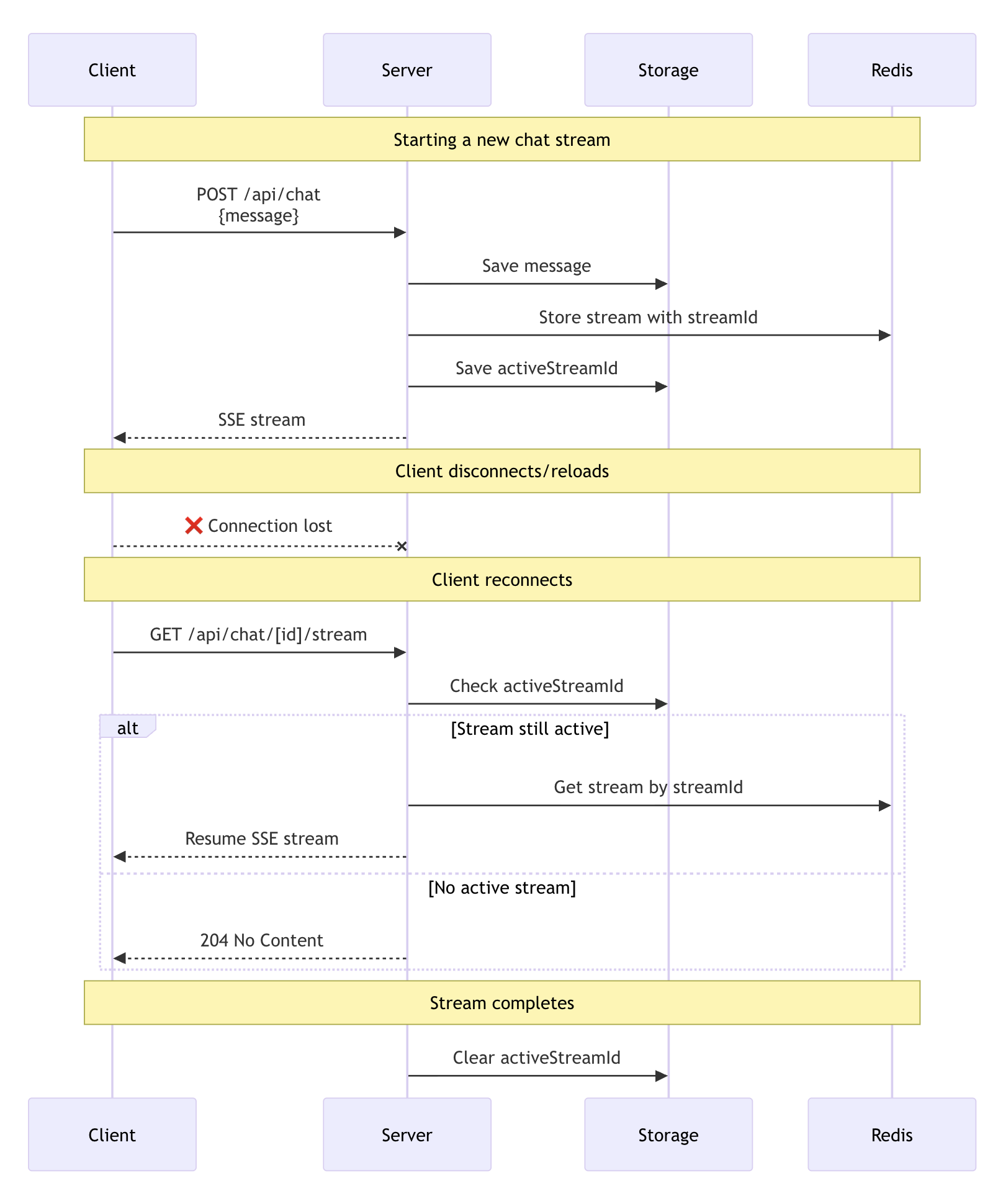 The diagram above shows the complete lifecycle of a resumable stream:
1. **Stream creation**: When you send a new message, the POST handler uses `streamText` to generate the response. The `consumeSseStream` callback creates a resumable stream with a unique ID and stores it in Redis through the `resumable-stream` package
2. **Stream tracking**: Your persistence layer saves the `activeStreamId` in the chat data
3. **Client reconnection**: When the client reconnects (page reload, or returning to a backgrounded page after a network disconnect), the `resume` option triggers a GET request to `/api/chat/[id]/stream`
4. **Stream recovery**: The GET handler checks for an `activeStreamId` and uses `resumeExistingStream` to reconnect. If no active stream exists, it returns a 204 (No Content) response
5. **Completion cleanup**: When the stream finishes, the `onEnd` callback clears the `activeStreamId` by setting it to `null`
## Customize the resume endpoint
By default, the `useChat` hook makes a GET request to `/api/chat/[id]/stream` when resuming. Customize this endpoint, credentials, and headers, using the `prepareReconnectToStreamRequest` option in `DefaultChatTransport`:
The callback receives the original, unencoded ID. Its returned `api` URL is used
verbatim, so encode and validate any ID you include in a custom URL yourself.
```tsx title="app/chat/[chatId]/chat.tsx"
import { useChat } from '@ai-sdk/react';
import { DefaultChatTransport } from 'ai';
export function Chat({ chatData, resume }) {
const { messages, sendMessage } = useChat({
id: chatData.id,
messages: chatData.messages,
resume,
transport: new DefaultChatTransport({
// Customize reconnect settings (optional)
prepareReconnectToStreamRequest: ({ id }) => {
return {
api: `/api/chat/${encodeURIComponent(id)}/stream`,
// Or use a different pattern:
// api: `/api/streams/${encodeURIComponent(id)}/resume`,
// api: `/api/resume-chat?id=${encodeURIComponent(id)}`,
credentials: 'include', // Include cookies/auth
headers: {
Authorization: 'Bearer token',
'X-Custom-Header': 'value',
},
};
},
}),
});
return
The diagram above shows the complete lifecycle of a resumable stream:
1. **Stream creation**: When you send a new message, the POST handler uses `streamText` to generate the response. The `consumeSseStream` callback creates a resumable stream with a unique ID and stores it in Redis through the `resumable-stream` package
2. **Stream tracking**: Your persistence layer saves the `activeStreamId` in the chat data
3. **Client reconnection**: When the client reconnects (page reload, or returning to a backgrounded page after a network disconnect), the `resume` option triggers a GET request to `/api/chat/[id]/stream`
4. **Stream recovery**: The GET handler checks for an `activeStreamId` and uses `resumeExistingStream` to reconnect. If no active stream exists, it returns a 204 (No Content) response
5. **Completion cleanup**: When the stream finishes, the `onEnd` callback clears the `activeStreamId` by setting it to `null`
## Customize the resume endpoint
By default, the `useChat` hook makes a GET request to `/api/chat/[id]/stream` when resuming. Customize this endpoint, credentials, and headers, using the `prepareReconnectToStreamRequest` option in `DefaultChatTransport`:
The callback receives the original, unencoded ID. Its returned `api` URL is used
verbatim, so encode and validate any ID you include in a custom URL yourself.
```tsx title="app/chat/[chatId]/chat.tsx"
import { useChat } from '@ai-sdk/react';
import { DefaultChatTransport } from 'ai';
export function Chat({ chatData, resume }) {
const { messages, sendMessage } = useChat({
id: chatData.id,
messages: chatData.messages,
resume,
transport: new DefaultChatTransport({
// Customize reconnect settings (optional)
prepareReconnectToStreamRequest: ({ id }) => {
return {
api: `/api/chat/${encodeURIComponent(id)}/stream`,
// Or use a different pattern:
// api: `/api/streams/${encodeURIComponent(id)}/resume`,
// api: `/api/resume-chat?id=${encodeURIComponent(id)}`,
credentials: 'include', // Include cookies/auth
headers: {
Authorization: 'Bearer token',
'X-Custom-Header': 'value',
},
};
},
}),
});
return